
Rearranging Deck Chairs?
Writing My Novel: Progress Report #30

This is fairly procedural, so feel free to skip to the “lesson” at the end.
Reading through the rough draft, I mostly saw how much the text needs work. But the words were, at least, there and the job is just taking a page-full of them and chopping away, editing, moving, rethinking.
However, there were also a few story events that didn’t work. They were supposed to build in steps or stages, but the differences between steps wasn’t distinct enough so it felt like the same changes were just happening over and over. And a few happened in the wrong place.
That requires outline work, thinking in terms of structure. Trying to do that, I realized I couldn’t see the outline any more. (What follows describes my experience working in Scrivener software, but I think it applies to any form of outline.)
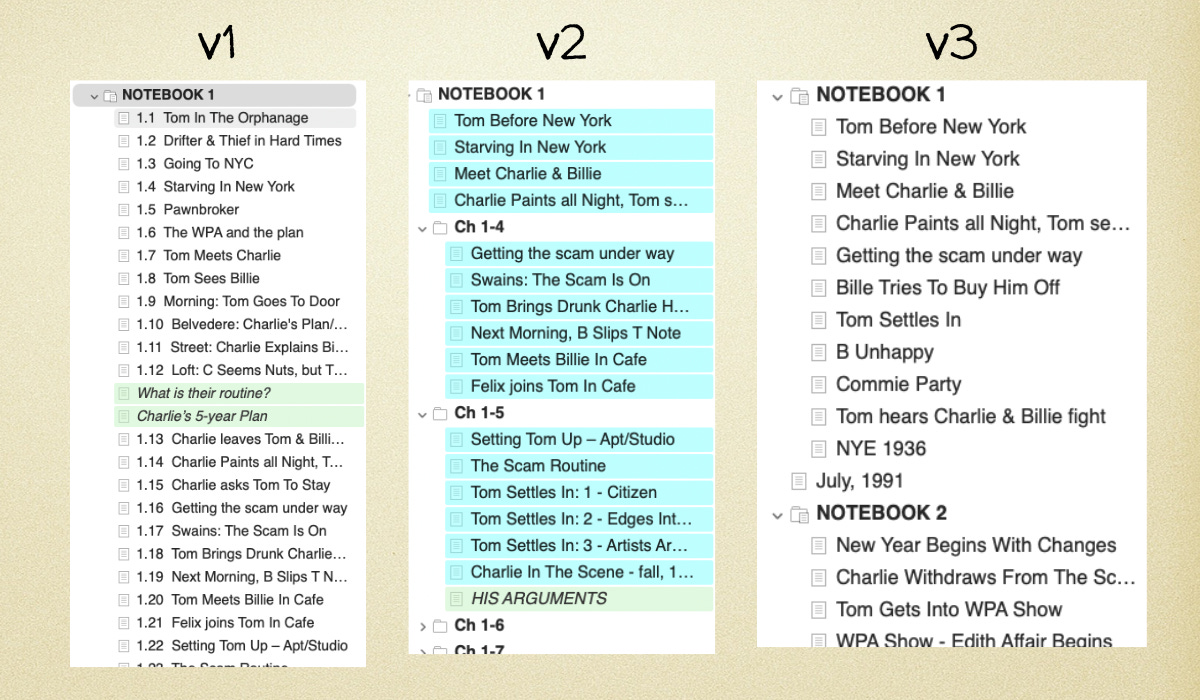
I had planned and written the rough draft the way I wrote screenplays -- by thinking in scenes. Each scene was a separate document. That gave me an outline in the form of a list of scenes, one long flow (“v1” in the illustration.)
But books are sub-divided into chapters. A chapter may include several scenes, but it is somehow tied-together: it’s a “hunk of story,” and the end of a chapter signifies some kind of change or meaningful rest-stop on the journey.
I realized about six months ago that I didn’t know where my chapters were, within my list of scenes.
So I made chapter-folders. Within each folder, there were a handful of scenes/documents. Now the outline looked like “v2” in the illustration. And it was good. It helped. I saw the chapters, the story-hunks. I got a feel for them. Hooray! Learning by doing!
Then I decided the scenes shouldn’t be separate documents within the chapters. I have no idea why I thought this was important. Maybe I thought it mattered for the eventual exporting of the document. I really don’t remember. All I know is I spent days cutting-and-pasting sections of text into single-chapter-documents. This left my outline formatted as in the illustration’s “v3.”
And that’s where I was last week, when I realized: I can’t see my scenes. I can’t work on my outline, because I don’t know what’s where.
I had to spend a few days breaking my chapters back up into separate scenes, each one it’s own document/outline item. In other words, back to “v2.”
Likewise, I recently realized that I don’t want to use dashes instead of quotation marks for dialogue in the text. I spent a while putting in the dashes, and now I’m going to spend a while taking them out.
Doing stuff like this seriously feels like you have wasted time and lost your way.
But the truth is, you have to try things to know.
That is the lesson.
The fact that you find yourself re-arranging the deck chairs doesn’t necessarily mean you’re on the Titanic. It’s part of the process. It’s how you learn, by trying things out.
Art is something you do, and you can’t really know how to do it until you do it. And that includes doing some of it wrong and having to undo-it and re-do it.
Next book, I’ll know. I won’t make this particular mistake again.
I will wander into all-new dead ends, fall into all sorts of other traps...but I will know what form of outline-scenes-and-chapters work best for me. One less thing to fear.
On we go.
One thing I love about writing fiction is that it's a non-destructive medium. You can try anything, and if it works, you can improve it. If it doesn't, you can fix it, or delete it. There isn't any 'door of no return' like there would be if you were trying to do ice sculptures with a chainsaw (for that artist, going back is impossible). The delete key is your friend.
The most inspirational quote I've ever heard is something I've been living by now for a long time:
"The only way to figure out where the edge is, is to go over it."
It's a paraphrase, actually, of a statement by Hunter S. Thompson. There is a boatload of brilliant truth in that statement. How do you get from point A to point B? You just try, even if you begin with no good path in mind. When you do, that's when you start to figure out how to get there, even if those early steps may not have been in the perfect direction.
His statement was actually about taking risks and being reckless, saying you have to do dangerous stuff to get anywhere. If you've read his novels, that would make sense to you.
But there is a wisdom there that he might not even have been aware of. If you apply Thompson's theory to writing fiction, there's absolutely no danger in crossing over the edge. Regardless what happens, it's always a positive step in a positive direction, precisely because writing fiction is a non-destructive medium. It's the circuitous path to getting to point B. But it gets you there. Nothing else really does.
And for me, that completely dispels the fear of screwing up, and of being ashamed of not being perfect in early attempts. In writing fiction, you can always quite easily go back and do it better, regardless how you did it the first time. Snapshots in time of how you did it earlier are not in any way indications of how imperfect you might be.
Thompson's theory actually gives you a license to screw up! It's your get out of jail free card.
No one but you is ever going to see anything other than that final draft, anyway.
And about the dashes vs quotation mark thing: I don't know how well it works with punctuation issues but the "Project replace" button might be worth a try. 🤔
When I decided I didn’t like a character's name anymore I used the "Project replace" function and it worked perfectly. It works on the entire project or just the selected documents in the binder if you want.
On Windows the path is: Edit > Find > Project Replace.
It should be similar on Mac.